Couchbase Vector Search: Native vs Dedicated Database
Table of Contents
- Introduction
- How Couchbase Native Vector Search Works
- Designing a Couchbase Vector Index
- Couchbase Vector Search SDK Queries, Candidate Counts, and Results
- Hybrid Search and Filtering Without Surprises
- When Couchbase Vector Search Is Enough
- When a Dedicated Vector Database Is Justified
- Couchbase Vector Search Latency, Scale, and Relevance Test Plan
- Vector Database Migration Checklist
- end
- Introduction
- How Couchbase Native Vector Search Works
- Designing a Couchbase Vector Index
- Couchbase Vector Search SDK Queries, Candidate Counts, and Results
- Hybrid Search and Filtering Without Surprises
- When Couchbase Vector Search Is Enough
- When a Dedicated Vector Database Is Justified
- Couchbase Vector Search Latency, Scale, and Relevance Test Plan
- Vector Database Migration Checklist
- end
Introduction
Couchbase vector search lets an application keep operational documents, embeddings, metadata, and search indexes within the Couchbase platform. This creates a pleasantly simple architecture: update a product and its embedding in the same database, then search through an existing Couchbase SDK.
The harder question is whether production requires a dedicated vector database. Native search often suits Couchbase-centered applications, but the workload must guide the decision. Dataset size alone does not settle it; filtering, update rates, relevance, latency, operating skills, and recovery also matter.
This guide explains:
- How Couchbase native vector search indexes and SDK queries work
- How to design filtered and hybrid searches
- What to measure before making an architecture decision
- How to plan a safe vector database migration
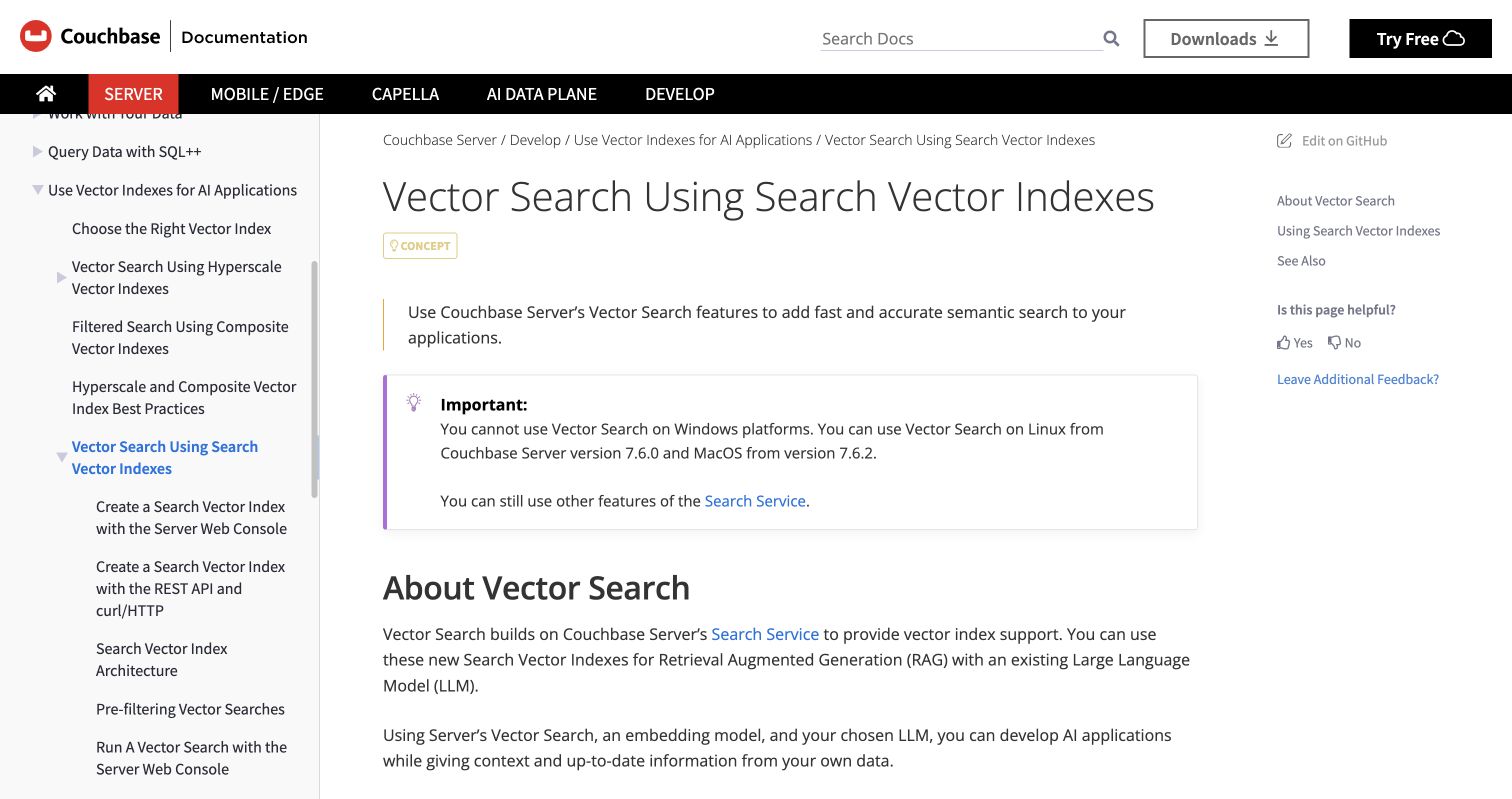
Screenshot: Couchbase Server vector search documentation, captured July 2026. Use the documentation matching your deployed server version.
How Couchbase Native Vector Search Works
Couchbase native vector search is built into the Search Service. The application turns text, images, or other material into numeric arrays called embeddings. Couchbase requires no particular provider. The application generates an embedding with its chosen model and stores it in a JSON document.
The basic flow has four parts:
- Store the original content and its metadata in Couchbase.
- Generate an embedding outside Couchbase with the selected model.
- Store the embedding array in the document.
- Create a Search Vector Index that maps the vector field and its similarity method.
The query vector must have the same number of dimensions as the vectors stored in the vector index. A mismatch causes the search to return no results, according to the Couchbase vector search documentation. The embedding model, version, dimensions, and similarity method therefore belong to the data contract.
A simplified document might look like this:
{
  "id": "article-1842",
  "title": "Resetting a customer password",
  "body": "...",
  "department": "support",
  "language": "en",
  "embedding_model": "model-v2",
  "embedding": [0.018, -0.221, 0.407]
}
A real embedding usually contains far more than three numbers. Keep the model identifier beside it so that mixed or outdated vectors can be found and replaced.
Designing a Couchbase Vector Index
A Couchbase vector index maps the vector field and declares its dimensions and similarity function. The official SDK example uses l2_norm and dot_product; the right choice depends on the embedding model. Do not select a metric based on an unrelated benchmark. Follow the model provider’s recommendation and confirm it with your own relevance set.
Before creating an index, record these decisions:
| Index decision | What to define | Failure to avoid |
|---|---|---|
| Vector field | One stable document path | Indexing missing or mixed fields |
| Dimensions | Exact model output length | Silent searches with no results |
| Similarity | Metric expected by the model | Poor ordering despite valid queries |
| Text fields | Fields needed for lexical search | Rebuilding when hybrid search is added |
| Filter fields | Tenant, locale, status, date, category | Filtering after retrieval and losing good matches |
| Stored fields | Small values returned with hits | Fetching large documents unnecessarily |
Use explicit mappings for a production vector index. Dynamic indexing is convenient but can enlarge indexes and obscure behavior. Index only fields needed for retrieval, filtering, scoring, or responses.
Couchbase Server’s current documentation says Vector Search is available on Linux from version 7.6.0 and macOS from 7.6.2,but not on Windows. Before setup, confirm the version, platform, SDK compatibility, and service configuration. Because product details can change, treat the current Couchbase documentation as the authority.
Couchbase Vector Search SDK Queries, Candidate Counts, and Results
For each search, the application creates an embedding, queries Couchbase, and converts the returned IDs or fields into a response. Couchbase provides vector examples for Go, Java, and Python on its primary SDK query guide, with links to other supported SDKs.
A shortened Python-shaped example illustrates the request structure:
query_vector = embed(user_text)
vector_query = VectorQuery(
    "embedding",
    query_vector,
    num_candidates=50
)
request = SearchRequest.create(MatchNoneQuery()).with_vector_search(
    VectorSearch.from_vector_query(vector_query)
)
result = scope.search(
    "knowledge-index",
    request,
    SearchOptions(limit=10, fields=["title", "department"])
)
Imports and method signatures depend on the SDK version. Copy them from the matching SDK reference; old examples may not compile.
Two controls deserve separate tests:
- Result limit determines how many hits the application receives.
- Candidate count controls how broadly the approximate search considers possible matches before returning the best ones.
A larger candidate pool can improve recall at greater per-query cost. Tune it through measurement. Couchbase also documents lower-level probe and centroid controls for relevant index types. Its search request reference warns that searching more clusters may improve recall while taking more compute time. Start with defaults, then change one parameter at a time.
Hybrid Search and Filtering Without Surprises
Useful Couchbase semantic search rarely searches every document. A retailer may need products available in Armenia, a support portal must separate tenants, and marketers may need material approved for one language and channel. These constraints belong in search design.
Couchbase vector search supports two related filtering and hybrid search patterns:
| Pattern | Purpose | Example |
|---|---|---|
| Vector pre-filter | Restrict which vectors are eligible | tenant_id = 42 and status = published |
| Hybrid text and vector query | Combine lexical and semantic evidence | Exact product code plus similar description |
A filter placed inside the vector query narrows the subset searched. Use it for access rules, tenant boundaries, locale, availability, or document state. Couchbase provides a concrete filter object example in its pre-filtering guide.
Do not confuse that filter with a separate top-level text query. Couchbase documents hybrid search results as a disjunction, or OR, between the regular Search query and vector query. Their scores are combined. That aids discovery but does not enforce authorization. Use pre-filters for mandatory access conditions and cover them with application security tests.
Three applications show the difference:
- A support assistant pre-filters by customer account before retrieving relevant answers.
- An online store filters by country and inventory status, then ranks products by semantic similarity.
- A campaign library uses hybrid search so an exact campaign code and conceptually similar briefs can both appear.
Test filters with adversarial cases. Tenant A must never receive tenant B’s results, even if their vectors are closer.
When Couchbase Vector Search Is Enough
Native vector search is a strong starting point when documents already live in Couchbase and retrieval is one application feature. The benefit is fewer storage systems and synchronization paths within one familiar security and backup environment.
Use this matrix as an initial screen, then test:
| Situation | Native Couchbase fit | Dedicated database fit |
|---|---|---|
| Source records already live in Couchbase | Strong | Adds synchronization work |
| Search uses document metadata heavily | Strong | Viable,but metadata must be copied |
| Team already operates the Search Service | Strong | Requires another operating model |
| Vector workload is modest or secondary | Strong | May be unnecessary complexity |
| Vector search is the entire product | Possible; benchmark carefully | Often worth evaluating |
| Rapid experiments across specialized algorithms | More constrained by Couchbase features | Often offers more specialized choices |
| Independent scaling and failure isolation are mandatory | Requires service and cluster planning | Often easier to isolate |
| Multi-database portability is a business requirement | Creates platform coupling | A neutral vector layer may help |
Consider a knowledge assistant for an internal support team. Its articles, permissions, status, and embeddings can remain in Couchbase. Native retrieval avoids copying every article update and deletion to another database. That simplicity often outweighs a small synthetic benchmark difference.
The same reasoning applies to product recommendations and campaign-asset discovery. When freshness and metadata correctness dominate, storing vectors beside source documents prevents many consistency bugs.
When a Dedicated Vector Database Is Justified
A dedicated vector database becomes attractive when retrieval dominates and must evolve independently. It will not automatically be faster, but its added control may justify the cost.
Investigate a dedicated platform when the project requires:
- Independent scaling, maintenance, or failure isolation for vector traffic
- A specialized index or reranking feature unavailable in the deployed Couchbase version
- Very large vector collections whose tested resource needs conflict with operational workloads
- Several source databases feeding one shared semantic retrieval layer
- Frequent algorithm experiments that would otherwise reshape production indexes
- A managed service whose operating model fits the team better
Consider a public search product serving several business units. It may ingest from Couchbase, object storage, and a warehouse while serving traffic unrelated to Couchbase transactions. A separate vector tier can provide a clean ownership and scaling boundary.
There is a cost, though. The team must synchronize inserts, updates, metadata, model versions, and deletions, monitor lag, and resolve conflicts. Security rules also require faithful replication. I would not accept that complexity for a vague promise of “better scale.” Require failure against a production target or a user-relevant feature gap.
Couchbase Vector Search Latency, Scale, and Relevance Test Plan
Do not compare databases with one warm query and an average response time. A useful test reproduces production data, filters, concurrency, update rates, and network paths. Separate embedding API time from database search time.
Run the evaluation in five stages:
- Build a relevance set of at least 100.300 representative questions with judged expected results. Include common, rare, misspelled, filtered, and no-answer queries.
- Load production-shaped documents and embeddings. Preserve realistic tenant sizes, metadata values, document lengths, and deletion patterns.
- Test cold starts, warm traffic, steady concurrent load, bursts, and indexing during updates. Report p50, p95, and p99 latency rather than only the mean.
- Measure retrieval quality with recall@k, precision@k, mean reciprocal rank, or normalized discounted cumulative gain. Choose user-relevant metrics.
- Record resource use, index build time, update visibility, recovery behavior, error rate, and cost under the same conditions.
| Test area | Metric | Acceptance question |
|---|---|---|
| User latency | p95 and p99 search time | Does it meet the application’s service target? |
| Relevance | Recall@10 or judged success rate | Are expected documents retrieved? |
| Freshness | Update-to-searchable delay | How quickly do changes appear? |
| Isolation | Cross-tenant result count | Is the count always zero? |
| Capacity | Queries per second at target latency | Is there safe headroom? |
| Recovery | Time and errors during node events | Does behavior meet the recovery plan? |
Repeat each run and publish the configuration. Latency numbers are nearly meaningless without vector count, dimensions, filter selectivity, candidate settings, replicas, hardware, and concurrency.
Vector Database Migration Checklist
A migration should preserve search behavior before improving it. Keep a stable retrieval interface so Couchbase and the candidate database share one request-response contract.
| Migration item | What to check | Why it matters |
|---|---|---|
| Embedding contract | Model, version, dimensions, normalization | Prevents incompatible vectors |
| Similarity method | Equivalent metric and score meaning | Scores may not be directly comparable |
| Metadata schema | Types, nulls, arrays, date handling | Filters can change silently |
| Identity | Stable document and chunk IDs | Needed for updates and deletion |
| Freshness | Lag target and retry policy | Stale results damage trust |
| Security | Tenant and permission filters | Prevents data exposure |
| Deletion | Hard delete and tombstone behavior | Avoids resurrected content |
| Observability | Lag, failures, query latency, quality | Makes drift visible |
| Rollback | Traffic switch and retained old index | Limits migration risk |
Use a staged process:
- Export or stream source documents without changing production reads.
- Generate missing embeddings with one pinned model version.
- Backfill the new index and reconcile document counts and IDs.
- Send shadow queries to both systems and compare result overlap, relevance, filtering, and latency.
- Move a small percentage of read traffic while Couchbase remains the fallback.
- Increase traffic only after quality, security, freshness, and recovery targets pass.
Dual writes still require periodic reconciliation. A successful API call does not prove both stores have identical searchable state. Compare source IDs, model versions, deletion markers, and a sample of metadata fields.
end
Couchbase vector search is often enough when it holds the source documents, metadata filters matter, and semantic retrieval is one application feature. It simplifies the architecture and removes a synchronization boundary, an operational advantage.
A dedicated database becomes reasonable when tests reveal unmet latency or relevance targets, a needed feature, or independent scaling and isolation requirements. Do not rely on product labels or unsupported performance claims.
Start with a representative collection, pin the embedding contract, establish security filters, and test under realistic load. If native search passes, keep it. If it fails, the measurements will show what a migration must improve.
Related Articles

AI SQLite Tools: A Guide to Local Database AI
Learn how AI SQLite tools simplify SQL, enable semantic search, and support safe mobile, desktop, and embedded database workflows.

libSQL Embeddings: SQLite Vector Search for RAG
Learn how to store, index, and query libSQL embeddings for semantic search, hybrid RAG, mobile, edge, and serverless applications.
AI PostgreSQL: Safe SQL and Development Guide
Learn safe AI PostgreSQL workflows for generating, testing, and optimizing SQL, migrations, pgvector search, pgai, and PostgresML.